

An earlier lesson covered how LLMs learn to predict text. This lesson covers two ways professionals adapt a general-purpose model to a specific need — fine-tuning and RAG — and goes deep on the second, since it's what the document chatbot from two lessons ago was actually built on.
Fine-tuning means taking an already-trained model and training it further on a specific, narrower dataset, actually adjusting its internal parameters. Prompting (including RAG) leaves the model completely unchanged and instead shapes its behaviour through what you send it at the moment you ask.
| Fine-tuning | Prompting / RAG | |
|---|---|---|
| Changes the model itself? | Yes — retrains on new data | No — model stays exactly as it was |
| Cost and effort | Significant — needs a prepared dataset and real training time | Low — just write a better prompt or add relevant context |
| Best for | Teaching a consistent tone, format, or specialised skill the model doesn't have by default | Giving the model facts it doesn't know, or facts that change often |
| Iteration speed | Slow — each change means retraining | Fast — change and test instantly |
In practice, most real applications reach for prompting and RAG first, since they're dramatically cheaper and faster to iterate on — fine-tuning is a more specialised tool for when prompting genuinely isn't enough.
An LLM has a training cutoff date and no access to your private data. If you want a chatbot that knows your specific company's products, policies, or documentation, you can't just paste everything into every prompt — it would be far too long and expensive — and retraining the model for this is extremely costly. Retrieval-Augmented Generation (RAG) solves this without touching the model at all.
The Library Analogy
A regular LLM is like a professor who read an enormous number of books before a certain date, but can't look anything up afterward. RAG is like giving that same professor access to your specific private library, and having them quickly find the relevant pages before answering your question.
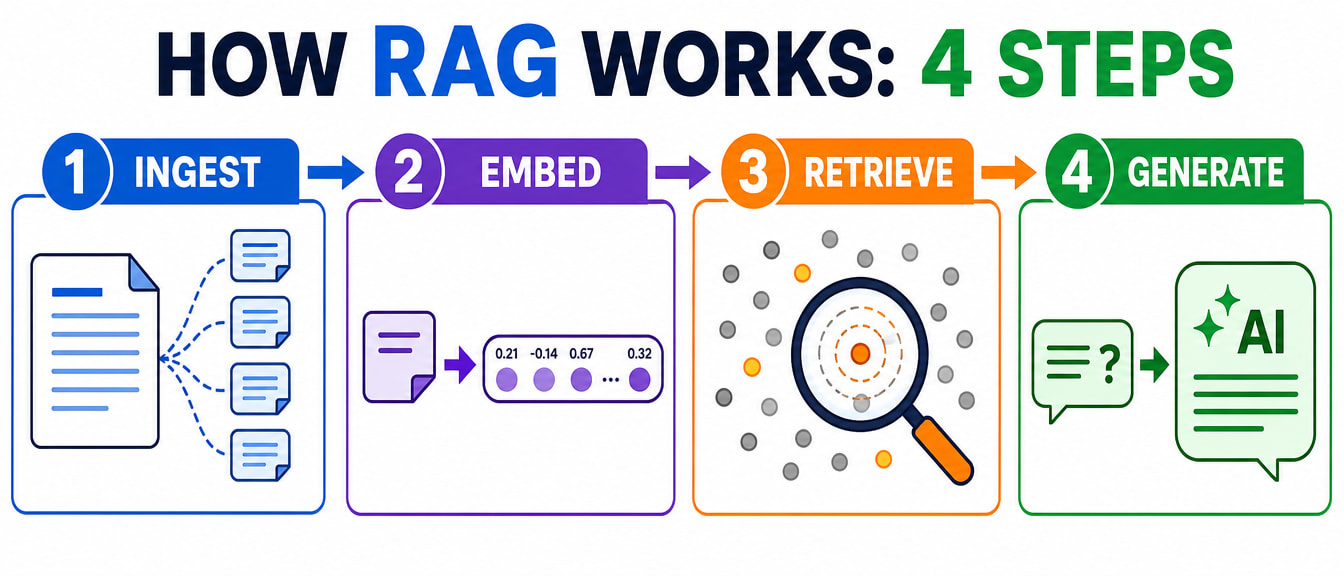
| Step | What happens |
|---|---|
| 1. Ingest | Your documents (a PDF, a website, internal docs) are split into small chunks — a few hundred words each. |
| 2. Embed | Each chunk is converted into a mathematical vector — a long list of numbers — using an embedding model. Similar meaning produces similar vectors, and these are stored in a vector database. |
| 3. Retrieve | When a user asks a question, the question itself is converted into a vector, and the system finds the stored chunks whose vectors are closest to it — the most relevant sections of your documents. |
| 4. Generate | The question plus those retrieved chunks are sent to the LLM together: "based only on this context, answer this question." The model answers from your actual data, not from its general training. |
This is exactly the process the LangChain example from the automation lesson implemented in code — now you know what each of its five steps was actually doing underneath.
A vector database is built specifically to store and search these numerical vectors efficiently, finding the closest matches among millions of chunks in a fraction of a second — a specialised tool for a specialised job, the same way a normal database is optimised for rows and columns rather than meaning-based similarity.
You now understand both how to adapt a model's behaviour and how to ground it in real data. The next lesson goes further still — from a model that answers to one that can actually act.