

DNS — Domain Name System — is the system that translates a human-readable domain name into the numeric IP address a computer actually needs to connect to a server. It is, in effect, the internet's phone book, looked up automatically on every single request.
When your browser needs to load example.com, roughly this happens: it asks a DNS resolver (often run by your internet provider) whether it already knows the answer; if not, the resolver asks a chain of DNS servers, working from the most general down to the most specific, until it reaches the nameservers responsible for example.com specifically; those nameservers return the actual IP address; and the resolver hands that back to your browser, which finally makes the real connection to the server.
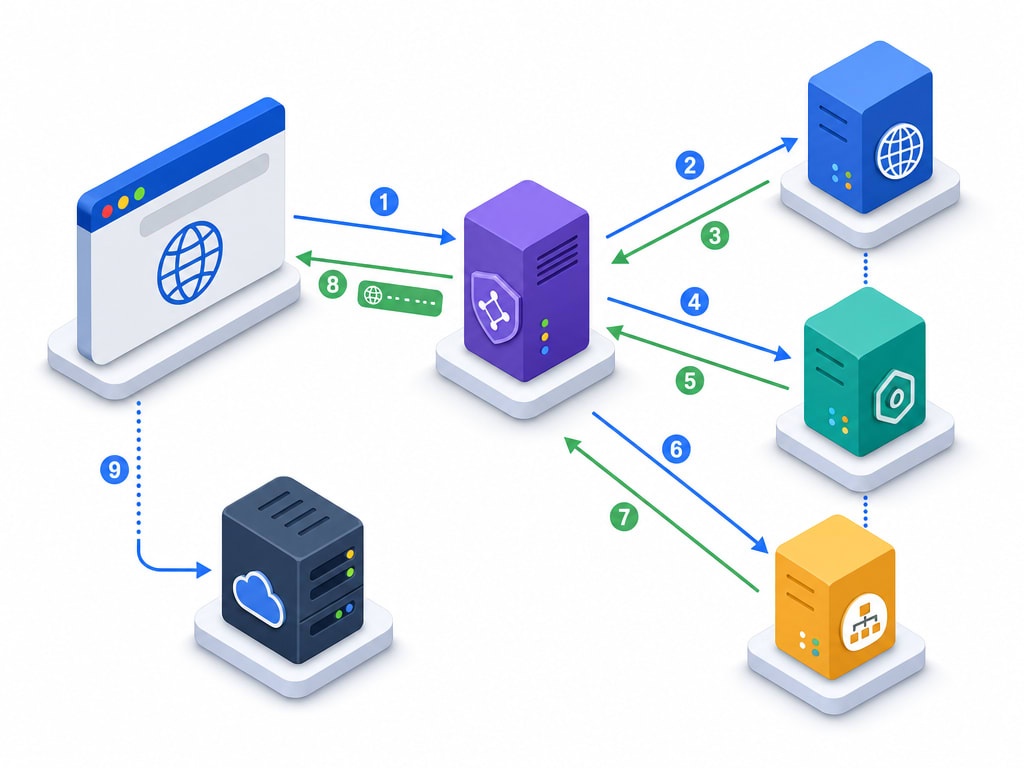
A domain's nameservers are the specific servers that hold the authoritative DNS records for it — the actual source of truth for where that domain points. When you register a domain, it comes with default nameservers from your registrar; when you buy hosting elsewhere, you typically either point your domain at that host's nameservers, or keep the registrar's nameservers and add individual records instead. Both approaches are covered practically in the connecting-a-domain lesson.
Looking up DNS on every single request, all the way through that full chain, would be slow — so the answer is cached at multiple points along the way: your browser, your operating system, your internet provider's resolver, and others in between. Each cached copy has a TTL (time to live), a duration after which it is allowed to expire and be looked up fresh.
This is why a DNS change — pointing a domain at new hosting, for instance — does not take effect everywhere instantly. Some visitors see the change within minutes; others, whose resolver cached the old answer with a long TTL, may see it hours later. This delay is commonly called propagation, covered with practical timing guidance in the connecting-a-domain lesson.
DNS changes are not risky to make, but they are not instant either. Plan any DNS change with the expectation that it may take anywhere from minutes to about 48 hours to be visible everywhere, and avoid making a change right before a critical moment (a launch event, a scheduled announcement) where you'd have no room to fix a mistake.
DNS itself is just the lookup mechanism. What it actually stores and returns are records — different types for different purposes, covered in full in the next lesson.