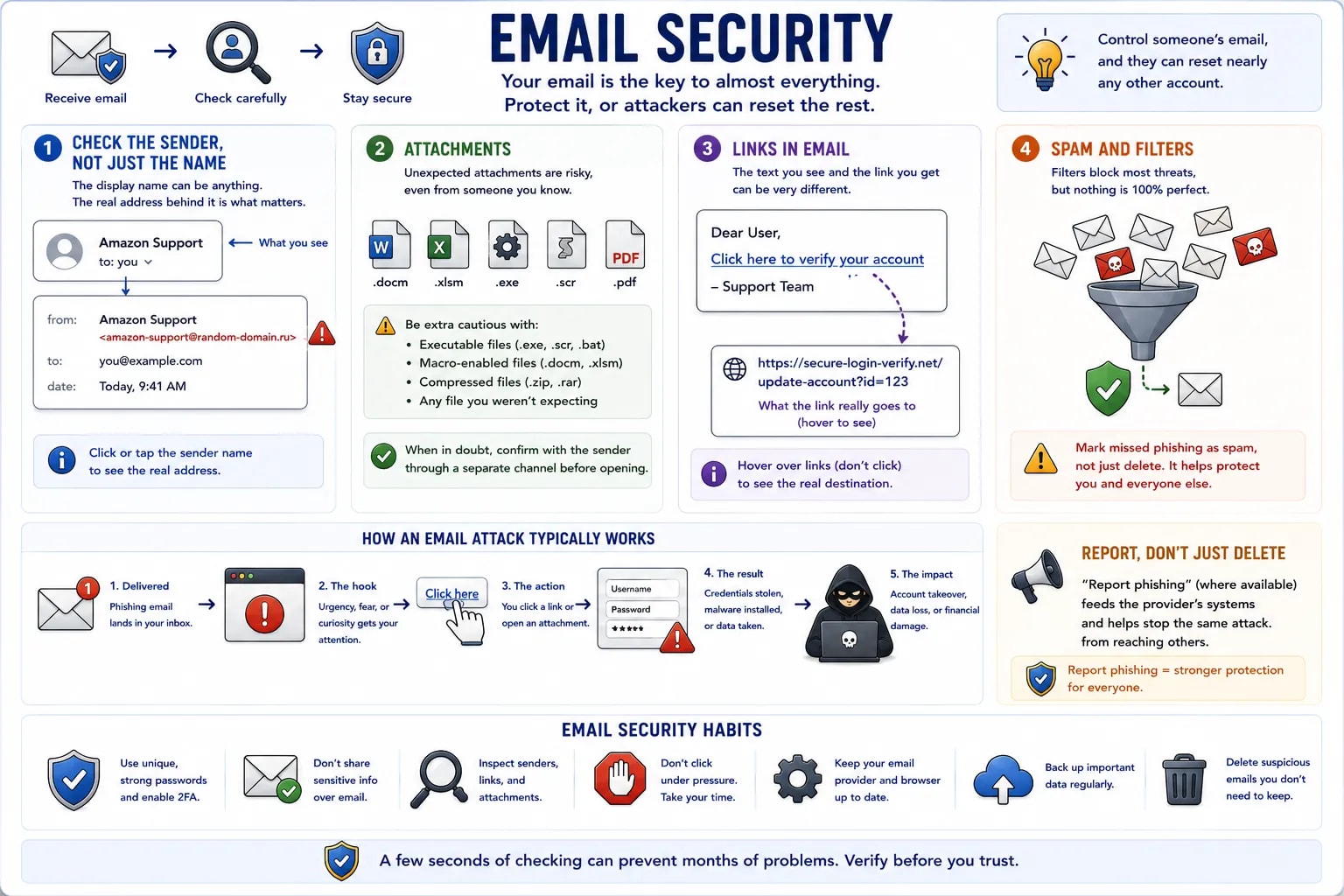
Email is the single most common delivery method for phishing and malware, mostly because it's still the account most other accounts are recoverable through — control someone's email, and password resets for nearly everything else become possible.
The display name shown ("Amazon Support") and the actual address behind it (amazon-support@random-domain.ru) are two separate things — most email clients only show the display name by default, which an attacker can set to anything at all. Clicking or tapping the sender name usually reveals the real address underneath.
An unexpected attachment — even one that looks like an invoice, resume, or document from someone recognizable — deserves suspicion, especially file types that can run code directly (.exe, .scr, macro-enabled .docm/.xlsm files). When in doubt, confirm with the sender through a separate channel before opening.
The same hover-before-clicking check from the safe browsing lesson applies directly here — an email link's visible text and its actual destination are frequently different, and this mismatch is one of the clearest tells available.
Modern spam filters catch the overwhelming majority of obvious phishing automatically — but nothing they catch should be assumed permanently blocked, and nothing they let through should be assumed safe. Marking a missed phishing email as spam (rather than just deleting it) helps train the filter for next time.
Report, don't just delete
"Report phishing" (where available, usually near "mark as spam") does more than delete a single email — it feeds the provider's spam detection for everyone. Worth using over a plain delete when the option exists.