

These five tools sit past the beginner track — worth knowing exist, worth reaching for once everything covered so far in this section feels natural. This closes out the SQL section.
A saved query you can SELECT from like a virtual table — the underlying data isn't duplicated, and the query re-runs every time you use it.
CREATE VIEW view_name AS
  SELECT ...;
CREATE VIEW HighEarners AS
SELECT name, department, salary
FROM Employee
WHERE salary > 70000;
SELECT * FROM HighEarners;| name | department | salary |
|---|---|---|
| Alice | HR | 75000 |
| Priya | IT | 82000 |
Common Mistakes
A lookup structure built on one or more columns that lets the engine jump straight to matching rows instead of scanning the whole table.
CREATE INDEX index_name
ON table_name (column);
CREATE INDEX idx_employee_department
ON Employee (department);
EXPLAIN SELECT * FROM Employee
WHERE department = 'IT';| type | key | rows |
|---|---|---|
| ALL | NULL | 5,000 |
| type | key | rows |
|---|---|---|
| ref | idx_employee_department | 12 |
type: ALL means a full table scan — every one of the 5,000 rows gets checked.type: ref means the engine used idx_employee_department to jump directly to the ~12 matching rows instead.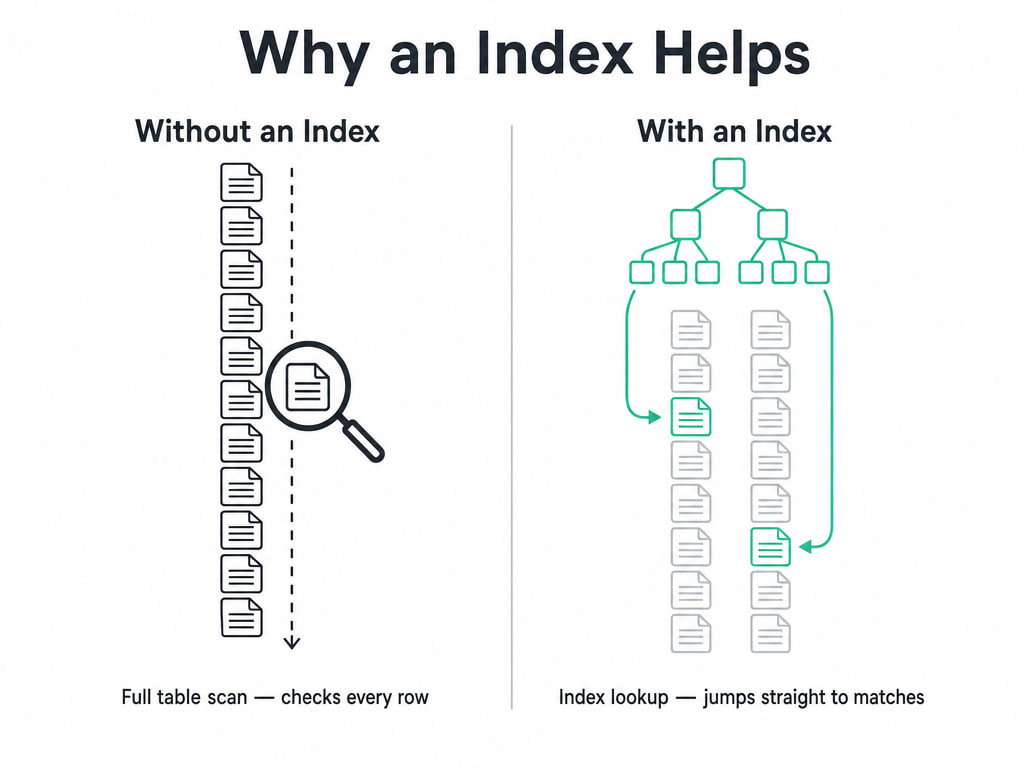
Common Mistakes
A saved block of SQL logic you can call by name, optionally passing parameters — the logic lives once in the database instead of being repeated in every app.
CREATE PROCEDURE name(params)
BEGIN
  ...
END;
CREATE PROCEDURE GiveRaise(IN emp_id INT, IN amount DECIMAL(10,2))
BEGIN
UPDATE Employee
SET salary = salary + amount
WHERE id = emp_id;
END;
CALL GiveRaise(1, 5000.00);CALL runs the procedure by name, passing emp_id and amount as parameters.Common Mistakes
A block of SQL that fires automatically when a specific table event — an INSERT, UPDATE, or DELETE — happens, with no application code involved.
CREATE TRIGGER name
{BEFORE|AFTER} {INSERT|UPDATE|DELETE} ON table
FOR EACH ROW
  statement;
CREATE TRIGGER LogSalaryChange
AFTER UPDATE ON Employee
FOR EACH ROW
INSERT INTO SalaryLog (employee_id, old_salary, new_salary)
VALUES (OLD.id, OLD.salary, NEW.salary);
UPDATE Employee SET salary = 70000 WHERE id = 1;| employee_id | old_salary | new_salary |
|---|---|---|
| 1 | 65000 | 70000 |
OLD and NEW give the trigger access to both the row's previous and new values in the same statement.Common Mistakes
EXPLAIN shows how the engine actually plans to run a query — whether it scans everything or uses an index — before you spend time guessing.
EXPLAIN SELECT * FROM Employee
WHERE department = 'IT';| id | select_type | table | type | key | rows |
|---|---|---|---|---|---|
| 1 | SIMPLE | Employee | ALL | NULL | 5,000 |
type: ALL and key: NULL together mean no index is being used — every row gets scanned.Common Mistake
Adding an index and never running EXPLAIN to confirm it's actually being used.
| Tool | What it's for |
|---|---|
| VIEW | A saved, reusable query that behaves like a table |
| INDEX | Faster lookups on columns you filter or join on often |
| STORED PROCEDURE | Reusable SQL logic, called by name from any application |
| TRIGGER | SQL that runs automatically on a table event |
| EXPLAIN | Shows how a query actually runs, before you guess |
You Don’t Need These on Day One
You don't need to master these five to write useful SQL — everything up through Common Table Expressions covers the fundamentals thoroughly. These are worth knowing exist, and worth coming back to once the rest feels natural.
This closes out the SQL section — from a single SELECT statement all the way to indexes, procedures, and triggers. Everything here builds directly on the four families covered early on: DDL, DML, DCL, and TCL are the foundation every one of these later lessons assumed.