

This element has a pink border and a blue outline with a width of 10px.
An outline is a line that is drawn around elements, OUTSIDE the borders, to make the element "stand out".
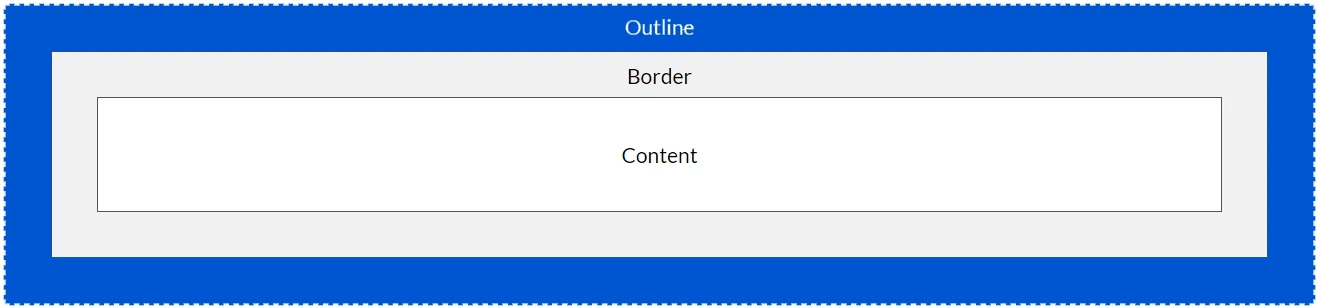
CSS has the following outline properties:
outline-styleoutline-coloroutline-widthoutline-offsetoutlineNote: Outline differs from borders! Unlike border, the outline is drawn outside the element's border, and may overlap other content. Also, the outline is NOT a part of the element's dimensions; the element's total width and height is not affected by the width of the outline.
The outline-style property specifies the style of the outline, and can have one of the following values:
dotted - Defines a dotted outlinedashed - Defines a dashed outlinesolid - Defines a solid outlinedouble - Defines a double outlinegroove - Defines a 3D grooved outlineridge - Defines a 3D ridged outlineinset - Defines a 3D inset outlineoutset - Defines a 3D outset outlinenone - Defines no outlinehidden - Defines a hidden outlineThe following example shows the different outline-style values:
A dotted outline.
A dashed outline.
A solid outline.
A double outline.
A groove outline. The effect depends on the outline-color value.
A ridge outline. The effect depends on the outline-color value.
An inset outline. The effect depends on the outline-color value.
An outset outline. The effect depends on the outline-color value.
Demonstration of the different outline styles:
p.dotted {outline-style: dotted;}
p.dashed {outline-style: dashed;}
p.solid {outline-style: solid;}
p.double {outline-style: double;}
p.groove {outline-style: groove;}
p.ridge {outline-style: ridge;}
p.inset {outline-style: inset;}
p.outset {outline-style: outset;}
Note: None of the other outline properties will have any effect, unless the outline-style property is set!
The outline-color property is used to set the color of the outline.
The color can be set by:
The following example shows some different outlines with different colors. Also notice that these elements also have a thin black border inside the outline:
A solid red outline.
A double green outline.
An outset yellow outline.
p.ex1 {
  border: 1px solid black;
  outline-style: solid;
  outline-color: red;
}
p.ex2 {
  border: 1px solid black;
  outline-style: double;
  outline-color: green;
}
p.ex3 {
  border: 1px solid black;
  outline-style: outset;
  outline-color: yellow;
}
The following example uses outline-color: invert, which performs a color inversion. This ensures that the outline is visible, regardless of color background:
A solid invert outline.
p.ex1 {
  border: 1px solid yellow;
  outline-style: solid;
  outline-color: invert;
}The outline-width property specifies the width of the outline,
and can have one of the following values:
The following example shows some outlines with different widths:
A thin outline.
A medium outline.
A thick outline.
A 4px thick outline.
p.ex1 {
  border: 1px solid black;
  outline-style: solid;
  outline-color: red;
  outline-width: thin;
}
p.ex2 {
  border: 1px solid black;
  outline-style: solid;
  outline-color: red;
  outline-width: medium;
}
p.ex3 {
  border: 1px solid black;
  outline-style: solid;
  outline-color: red;
  outline-width: thick;
}
p.ex4 {
  border: 1px solid black;
  outline-style: solid;
  outline-color: red;
  outline-width: 4px;
}The outline property is a shorthand property for
setting the following individual outline properties:
outline-widthoutline-style (required)outline-colorThe outline property is specified as one,
two, or three values from the list above. The order of the values does not
matter.
The following example shows some outlines specified with the shorthand outline
property:
A dashed outline.
A dotted red outline.
A 5px solid yellow outline.
A thick ridge pink outline.
p.ex1 {outline: dashed;}
p.ex2 {outline: dotted red;}
p.ex3 {outline: 5px solid yellow;}
p.ex4 {outline: thick ridge pink;}The outline-offset property adds space
between an outline and the edge/border of an element. The space between an
element and its outline is transparent.
The following example specifies an outline 15px outside the border edge:
This paragraph has an outline 15px outside the border edge.
p {
  margin: 30px;
  border: 1px solid black;
  outline: 1px solid red;
  outline-offset: 15px;
}
The following example shows that the space between an element and its outline is transparent:
This paragraph has an outline of 15px outside the border edge.
p {
  margin: 30px;
  background: yellow;
  border: 1px solid black;
  outline: 1px solid red;
  outline-offset: 15px;
}| Property | Description |
|---|---|
| outline | A shorthand property for setting outline-width, outline-style, and outline-color in one declaration |
| outline-color | Sets the color of an outline |
| outline-offset | Specifies the space between an outline and the edge or border of an element |
| outline-style | Sets the style of an outline |
| outline-width | Sets the width of an outline |